EQ Pro - Equalizer & Volume
- 4.7
- Rating
- 1.00M
- Installs
- Free
- Price
 Analysis by App-foxy
I noticed EQ Pro - Equalizer & Volume because it promises to solve a familiar phone-audio problem: music that sounds flat, speech that feels buried, or volume that seems weaker than expected. After spending time with it as a Music & Audio app, my impression is that its strongest appeal arrives quickly. You can make a noticeable change to the character of sound without replacing your music player or learning a complicated production tool.
That immediate effect is useful, but it also raises the more important question: will you still open it after the first few listening sessions? My answer is mostly yes, although not for everyone. EQ Pro is best understood as a practical listening adjustment tool rather than a complete audio studio. It can become a handy part of a daily routine when you have recurring problems with headphones, quiet videos, or inconsistent recordings. It is less convincing if you expect every source to improve automatically or want precise, professional-grade control.
What the first week feels like
The first few days are naturally the most entertaining. I tried approaching the app with a simple goal instead of immediately chasing the loudest possible output: make ordinary listening more comfortable. That distinction matters. A bass booster can make a track feel exciting within seconds, while a more restrained equalizer adjustment can make it easier to hear vocals or instruments without turning the whole mix into a blur.
You May Also Like

 Blood Strike: 2.5 Anniversary
Blood Strike’s Loadouts Turn Every Drop Into a Tactical Gamble
A close look at Blood Strike’s custom loadouts: how fast access to signature weapons reshapes its battle royale rhythm, rewards preparation, and narrows the gap between fights.

 Pandora - Music & Podcasts
Pandora’s Music Is Easy to Start, but Harder to Recover
Pandora’s strength is its low-effort path from a seed to a station. Its weak spot is how much confidence it asks you to place in connection, setup, and quiet recovery.

 8 Ball Pool
 Is Built on Rivalries, Rematches, and Routine
A close look at the rivalries, rematches, shared routines, and unanswered safety questions that turn a quick pool match into a persistent mobile community.

 Samsung Music
’s Quiet Strength Is Playing What You Already Own
Its reach comes less from spectacle than from dependable access to a personal library. That simplicity is both the app’s strongest retention engine and its ceiling.

 AccuWeather: Weather Radar
AccuWeather Review: A Quick, Clear Forecast for Everyday Decisions
For everyday plans, the best forecast is the one you can understand quickly. AccuWeather makes rain timing, radar, and local conditions easy to act on, with a few trade-offs.

 Hill Climb Racing
Why Hill Climb Racing Still Turns Crashes Into One More Run
A tiny car, a bumpy hill and one more upgrade: Hill Climb Racing keeps resurfacing because its simple chaos makes every near-miss feel personal.
More From Our News Desk
View All News


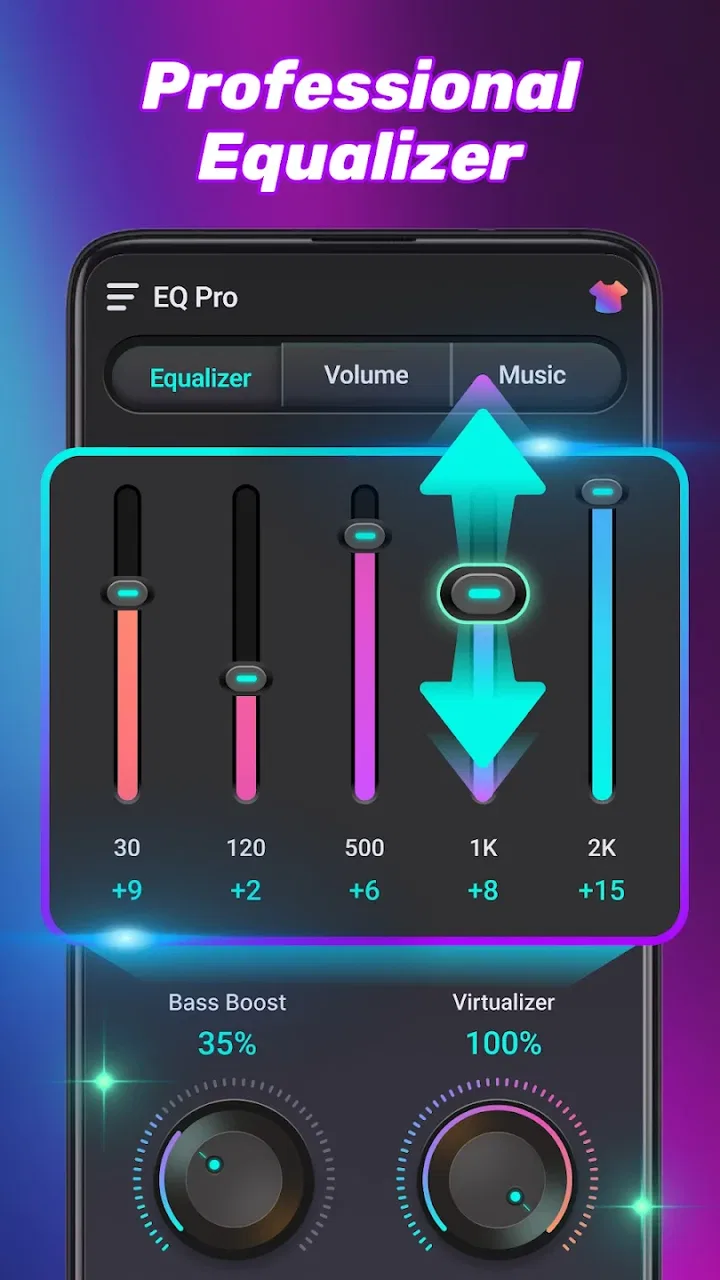
The app’s central idea is straightforward. It combines equalizer controls with bass enhancement and volume amplification, so you can use it for different kinds of listening rather than installing separate tools for each issue. The store summary describes it as an all-in-one equalizer, bass booster and volume amplifier, but in practice the useful question is how carefully you apply those controls. More power is not automatically better sound.
For a new user, I recommend beginning with a familiar song or podcast and making one change at a time. Start with a small tonal adjustment, listen for a few seconds, then compare it with the original. If you raise several areas together, it becomes difficult to tell whether you improved clarity or simply made the audio louder. This is one of the app’s first hidden lessons: perceived improvement often comes from a modest balance change, not maximum amplification.
EQ Pro is free, which makes that experimentation easy to justify. It has an Everyone content rating, and its broad presentation should feel approachable even if you have never used an equalizer before. The developer is IPLUG, and the app has reached over half a million installs with a 4.7 average from around seven thousand ratings. Those figures suggest that the basic promise is resonating with a substantial audience, though popularity does not remove the need to listen carefully and protect your ears.
The first-week appeal is particularly strong for people who use several kinds of audio every day. A playlist may sound acceptable through one pair of headphones but thin through another. A spoken video may have enough overall volume yet still lack vocal presence. A quick adjustment can make those situations less irritating. I also found the idea useful when switching between music and spoken content, because the best balance for a bass-heavy track is not necessarily the best balance for dialogue.
Small adjustments are more useful than dramatic ones
The most practical workflow is to treat the equalizer as a correction tool. If voices feel recessed, I would gently emphasize the area that improves presence rather than raising the entire output. If music sounds weak, I would test a controlled bass increase while checking whether vocals become muddy. When the result is harsh, reducing the boost is usually more effective than pushing the volume higher.
This approach also reveals a trade-off. An amplifier can make quiet material easier to hear, but it cannot restore detail that was never recorded. It may also expose distortion already present in a low-quality file or stream. In other words, EQ Pro can change presentation, not magically upgrade the source. That is an important expectation to set during the first week, especially if you are comparing it with a higher-quality recording and hoping for a transformation.
A realistic everyday example is a morning commute. You may be listening to a podcast in a noisy environment, then switching to music during the walk home. Instead of leaving one aggressive setting active all day, I would use a modest speech-friendly balance for the podcast and return to a gentler music setting afterward. The benefit comes from matching the adjustment to the source, not from keeping the strongest boost enabled continuously.
Why it can remain useful from month to month
Novelty fades quickly with audio utilities. Once the first dramatic bass effect becomes familiar, an app needs to solve a repeated problem to earn permanent space. EQ Pro has a chance of doing that because the need for small corrections returns whenever your listening setup changes. Different headphones, speakers, rooms, recordings and volume levels can all make the same content feel different.
I see the most lasting value in three recurring situations. First, it can help compensate for a listening device whose sound does not suit you. Second, it can make mixed content more comfortable when songs, videos and spoken recordings vary widely. Third, it gives you a quick way to experiment before deciding whether the problem is actually the hardware or the source file.
That last use is easy to overlook. If a track only sounds enjoyable after heavy boosting, the better long-term answer may be different headphones or a better recording. If every podcast needs amplification, the issue may be the speaker placement or the listening environment. EQ Pro is useful as a diagnostic aid because it lets you test whether a tonal change helps, but it should not encourage endless compensation for equipment that fundamentally does not suit you.
The app also compares favorably with the usual alternative of relying entirely on a phone’s built-in audio controls. System controls are convenient, but they may be limited or inconsistent across devices. A dedicated app gives the adjustment a clearer purpose and makes it easier to think in terms of sound rather than searching through general settings. On the other hand, built-in controls can be preferable when you want the least possible maintenance and do not need extra amplification.
Compared with a full desktop equalizer or a music-player-specific audio engine, EQ Pro is more accessible but less specialized. A desktop solution may offer deeper routing, detailed bands and more precise control, while a player with its own equalizer may behave more predictably within that player. EQ Pro makes more sense when you want a convenient, general listening companion rather than a carefully engineered setup for recording, mixing or mastering.
Its month-to-month value depends on whether your habits actually involve changing sources. If you listen to one carefully mastered album through the same equipment every day, you may set a preference once and forget the app. If you move between earbuds, phone speakers, streaming services and spoken content, the utility is easier to justify. The recurring value is practical and situational, not something that grows simply because the app remains installed.
A routine that avoids constant fiddling
I would create a simple listening routine instead of adjusting every track. Choose one familiar music track, one spoken recording and one quieter video. Use them as reference material whenever you change your setup. Make a small correction, check all three sources, and stop when the result is acceptable across them. This prevents one song from dictating a setting that makes everything else uncomfortable.
Another useful habit is to return to a neutral balance after a listening session that uses a strong effect. Bass-heavy settings can feel impressive at first and tiring later, particularly when you use them for many different recordings. A neutral reset gives your ears a comparison point and helps you notice whether the adjustment is still helping. This is a small maintenance habit, but it makes the app more sustainable.
For spoken content, I would prioritize intelligibility over loudness. Raising the overall level can make background noise louder as well, while a careful tonal adjustment may make words easier to follow at a lower comfortable volume. For music, I would be more conservative with amplification and judge the result after several minutes rather than after the first exciting burst of sound.
The maintenance burden behind the convenience
EQ Pro is not difficult to understand, but any app that changes audio adds a layer between the source and your ears. That layer needs occasional attention. You may need to check whether a setting that helped one type of content is now making another type too bright, too boomy or simply tiring. The burden is not technical expertise so much as remembering that one adjustment cannot suit every recording.
This is where the app’s all-in-one approach has both a strength and a weakness. Having equalization, bass enhancement and amplification together is convenient, but it also makes overcorrection easy. A user can increase bass and volume at the same time, perceive an immediate improvement, and only later notice distortion or fatigue. I would treat each control as a separate experiment, especially during the first few sessions.
The current version is 1.1.4, and the app supports Android 7.0 and newer. That broad compatibility makes it accessible to people using older Android phones, not only recent devices. Still, compatibility should not be confused with identical behavior on every phone. Audio output can vary with hardware, headphones and the way different apps handle sound, so I would judge the result on your own device rather than assuming another user’s setting will translate perfectly.
A useful maintenance check is to test the app after changing headphones or moving from headphones to the phone speaker. A setting that sounds balanced through earbuds may become unpleasant through a small speaker. I would also check after switching from music to video, because dialogue and music place different demands on the same tonal balance. These checks take little time and prevent the common mistake of leaving an unsuitable boost active for days.
There is also a hearing-safety consideration that deserves plain language. Volume amplification is not a reason to listen louder than is comfortable. If you need more volume because of a noisy environment, shortening the listening session and improving the physical fit of your headphones may be wiser than continually increasing output. EQ Pro can make sound more audible, but it cannot make prolonged loud listening harmless.
Where the friction starts to show
The largest source of friction is the temptation to chase a perfect setting. Audio is subjective, and the “right” balance changes with mood, content and equipment. An equalizer can encourage endless tweaking because every adjustment produces an immediate difference. After a while, you may spend more time changing sound than enjoying it. I consider that a real limitation for users who prefer appliances that simply work without supervision.
Another point of caution is the difference between louder and clearer. Amplification can create the impression of detail because louder sound often feels more energetic. I recommend comparing at similar listening levels whenever possible. Otherwise, you might choose a setting because it is louder rather than because it is more accurate or comfortable.
Heavy bass is another source of fatigue. It can be enjoyable for a short session, but too much low-end energy may make vocals less distinct and turn a varied playlist into a tiring experience. The app is not at fault for offering bass enhancement; the responsibility is in how the control is used. My preference is to use it as a small correction for thin-sounding output, not as a permanent extreme effect.
People who want detailed audio production controls should probably choose a more specialized tool. EQ Pro is not the choice I would make for mixing a recording, balancing multiple tracks or building a studio workflow. Its appeal is speed and everyday listening. Similarly, if your phone and headphones already provide a satisfying, stable sound, adding another audio layer may create more complication than benefit.
I would also skip it if you dislike adjusting settings for different situations. The app rewards a listener who is willing to notice differences and make occasional corrections. Someone who wants one fixed profile for every song may find a player with a simple preset system more comfortable. The best alternative is not always the one with more controls; sometimes it is the one that removes decisions.
Does it earn a lasting place?
After the initial excitement settles, I think EQ Pro earns its place for a specific kind of Android listener: someone who regularly switches between audio sources and wants a practical way to correct weak, uneven or uncomfortable sound. Its free availability removes the biggest barrier to trying it, and its Everyone rating makes the intended audience broad. The combination of equalization, bass adjustment and amplification is useful when applied with restraint.
Its long-term weakness is that the value is not automatic. You have to develop a habit of checking whether an adjustment still serves the content. Without that habit, the app can become a source of exaggerated bass, overly loud playback or settings that only suit one favorite track. The best experience comes from treating it as a small tool in your listening routine, not as a permanent “make everything better” switch.
My recommendation is to test it with familiar material, begin close to neutral, and make changes slowly. Keep the setting that improves several types of content, not only the one that sounds most dramatic for thirty seconds. If the app helps you hear speech more comfortably, makes a particular pair of headphones less tiring, or gives your everyday listening a consistent correction, it has recurring value. If you keep reaching for maximum volume and still feel dissatisfied, the better investment may be different hardware or better source material.
Ultimately, EQ Pro - Equalizer & Volume is more convincing as a maintenance tool than as a novelty effect. It can remain useful month after month because listening conditions keep changing, but it rewards moderation and a little awareness. I would recommend it to curious listeners who want accessible control over their Android audio, while steering professionals and no-fuss users toward more specialized or simpler alternatives. For the right person, the lasting benefit is not louder sound; it is more comfortable sound with fewer daily compromises.
FAQs for EQ Pro - Equalizer & Volume
01What features does EQ Pro - Equalizer & Volume offer?
EQ Pro provides a comprehensive suite of audio customization tools, including a 10-band equalizer, bass booster, and virtualizer. It allows users to tailor sound profiles to their preferences, offering presets for various music genres and the ability to create custom profiles. Additionally, it supports multiple audio formats and streaming services.
02Is EQ Pro - Equalizer & Volume compatible with all music apps?
Yes, EQ Pro is designed to work seamlessly with a wide range of music apps and streaming services. Whether you use Spotify, Apple Music, or other popular platforms, EQ Pro enhances audio output directly from these apps, providing a richer and more tailored listening experience.
03Does EQ Pro - Equalizer & Volume drain battery life significantly?
While EQ Pro is optimized for performance, any audio processing app can have a slight impact on battery life. However, the app is designed to minimize resource usage, ensuring that it delivers high-quality audio enhancements without noticeably affecting your device's overall battery performance.
04Is there a cost associated with using EQ Pro - Equalizer & Volume?
EQ Pro offers both free and premium versions. The free version includes basic features with limited access to advanced settings, while the premium version, available through a subscription, unlocks the full suite of features, including ad-free usage and additional sound customization options.
05How user-friendly is the EQ Pro - Equalizer & Volume interface?
EQ Pro boasts an intuitive and user-friendly interface, making it accessible for both beginners and advanced users. The app features easy-to-navigate menus and straightforward controls, allowing users to effortlessly adjust sound settings and create personalized audio experiences with minimal effort.
Pros
- Intuitive user interface for easy navigation.
- Customizable presets for personalized sound.
- Supports a wide range of audio formats.
- Seamless integration with streaming apps.
- Minimal battery consumption during use.
Cons
- Limited free features without subscription.
- Occasional ads in the free version.
- Not compatible with older OS versions.
- Advanced settings can be overwhelming.
- Requires internet for some features.

EQ Pro - Equalizer & Volume
Gallery